Ever found a massive diamond vein in a mineshaft, only to spend five minutes trying to explain the exact coordinates to your friend? Or maybe you've spotted an invisible player flanking your Bedwars base, but typing in chat takes too long. Communication in Minecraft can be incredibly clunky when you need to quickly relay visual information. The Markers mod on Lunar Client completely solves this by bringing a modern, FPS-style pinging system directly into Minecraft.

What is the Markers Mod?
The Markers mod allows you to place visual tags on nearly anything with a hitbox, including blocks, mobs, players, boats, minecarts, and dropped items. Once placed, your teammates can see the marker on their own screen in real time, making callouts faster and far more precise than typing in chat; provided that your teammates are using Lunar Client with the mod enabled.
Using the Markers Mod on Lunar Client
The Markers mod is available across all Minecraft versions on Lunar Client. If you do not have Lunar Client installed already, you can download it here.
Once you've launched your preferred Minecraft version, join any world or server and navigate to Right Shift > Mods > Markers to configure both your Marker keybind and your Clear Markers keybind, since neither is bound by default.
Marker Types
A quick tap of your Marker keybind instantly drops a Normal Marker, which is the fastest way to make a callout when you don't need anything fancy. Holding the keybind down instead opens a wheel selection with four marker types to choose from:

Normal Marker: The standard ping for general points of interest.
⚠ Danger Marker: Essential for calling out incoming enemies, traps, or hazards.
! Marker: Great for highlighting important drops or objectives.
? Marker: Perfect for pointing out suspicious areas or unchecked corners.
Placing a marker plays a high pitched ding, while the Danger Marker uses a distinct, lower pitched tone so your team can recognize threats by sound alone.
Pressing the Clear Markers keybind clears all markers on your screen. To remove a single marker you placed, simply middle click it. Middle click to remove can be toggled off in the Markers mod settings.
Customizing Visibility and Display
Visual clutter can be a death sentence in fast-paced game modes like Skywars or Bedwars. The Markers mod gives you incredibly granular control over how much information stays on your screen at any given time.
Duration and Spatial Information
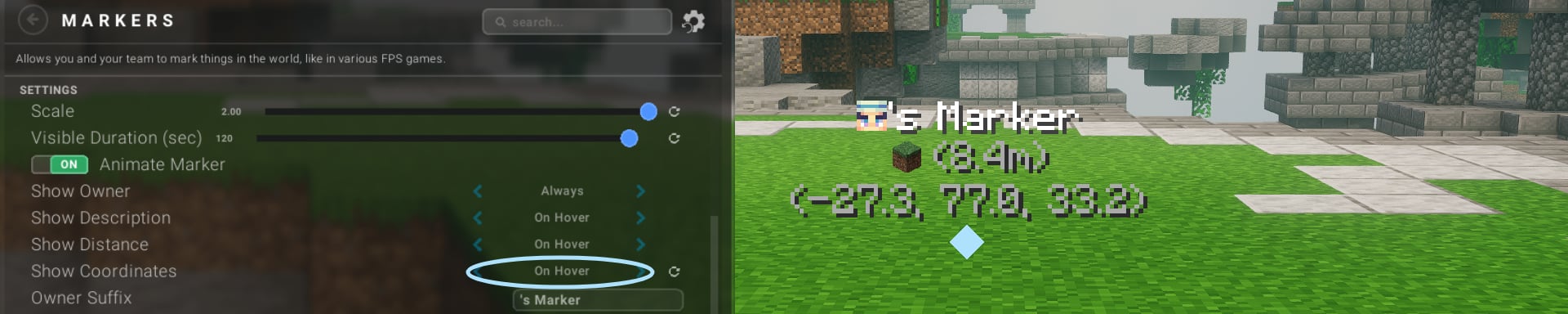
You can adjust the marker visibility duration anywhere from 5 to 120 seconds, with the default set to a comfortable 20 seconds. By default, the owner's name is always visible on the marker, while the distance (in meters) and a description of the marked object appear only when you hover your crosshair directly over the ping. If you prefer maximum spatial awareness, you can even enable coordinate displays.
Controlling Marker Sharing
A ping system is only useful if the right people can actually see it. You have total control over who receives your pings right from the mod menu settings.
By default, markers automatically sync with your Hypixel Party and the team systems on supported servers. This means you can jump right into a game and start coordinating with your squad immediately. If you are playing on a private SMP or a different server setup, you can manually toggle marker sharing for Vanilla Minecraft Scoreboard Teams or your Lunar Friends list.
Direction HUD Integration
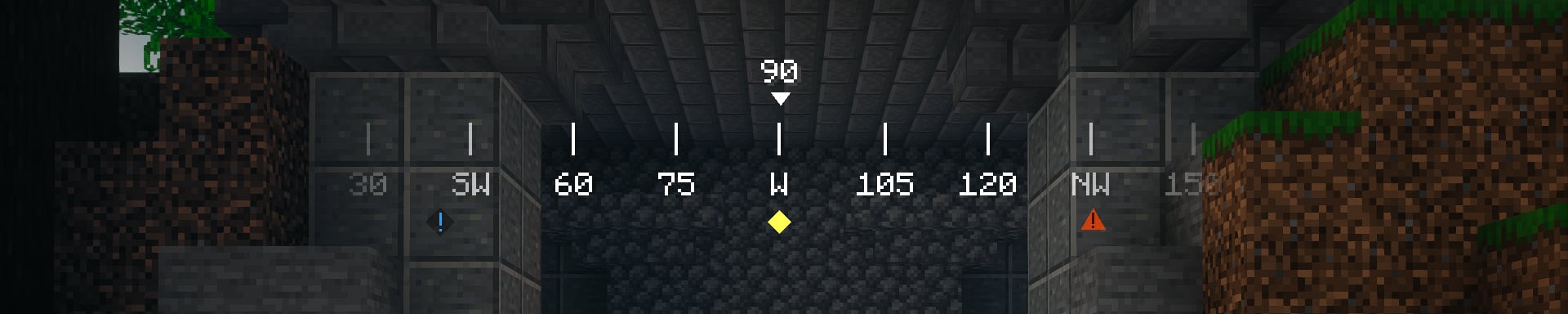
Markers also integrate with the Direction HUD mod, which displays the corresponding Normal, Danger, !, or ? icon pointing toward the marker's location. This means a teammate doesn't even need the marker in their direct line of sight to know a threat or callout exists somewhere nearby.
Tailoring the HUD Display
The default display shows the owner's Minecraft head alongside a text suffix that can be set to anything you want. For the description, it defaults to an icon of the block or item you pinged. Both the owner and the description can be changed to display their names instead of the icon.
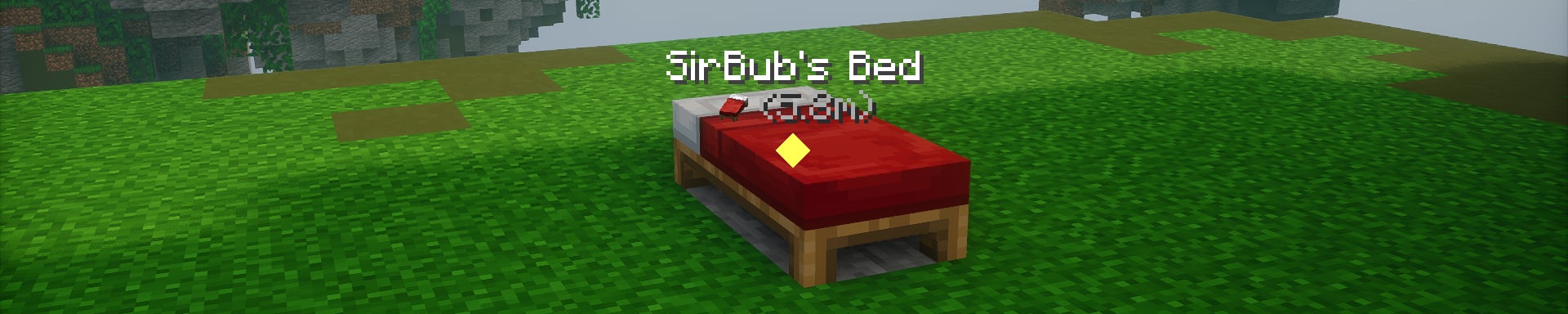
If you prefer a minimal HUD during PVP, you can strip this down. Turning on Compact Mode removes the text suffix entirely, forcing the display to only show the owner's head and the item icon. Beyond that, you can customize the scale of the markers, enable a background for better contrast, adjust the text shadow, and even assign custom colors for each of the four marker variants to match your setup.
Sounds and Notifications
You can independently adjust Ding Volume (Self) and Ding Volume (Others) to control how loud your own markers are compared to your teammates'. If you'd rather be notified in chat or through a Lunar Client popup whenever a marker is placed, both Chat Notification and Lunar Client Notification can be enabled, though they're off by default.
If you have any questions or are experiencing issues with your client, create a ticket on our Support Website or join the Lunar Client Discord server! If you are unsure of how to create a ticket, please view the Lunar Client Support Guide.
